

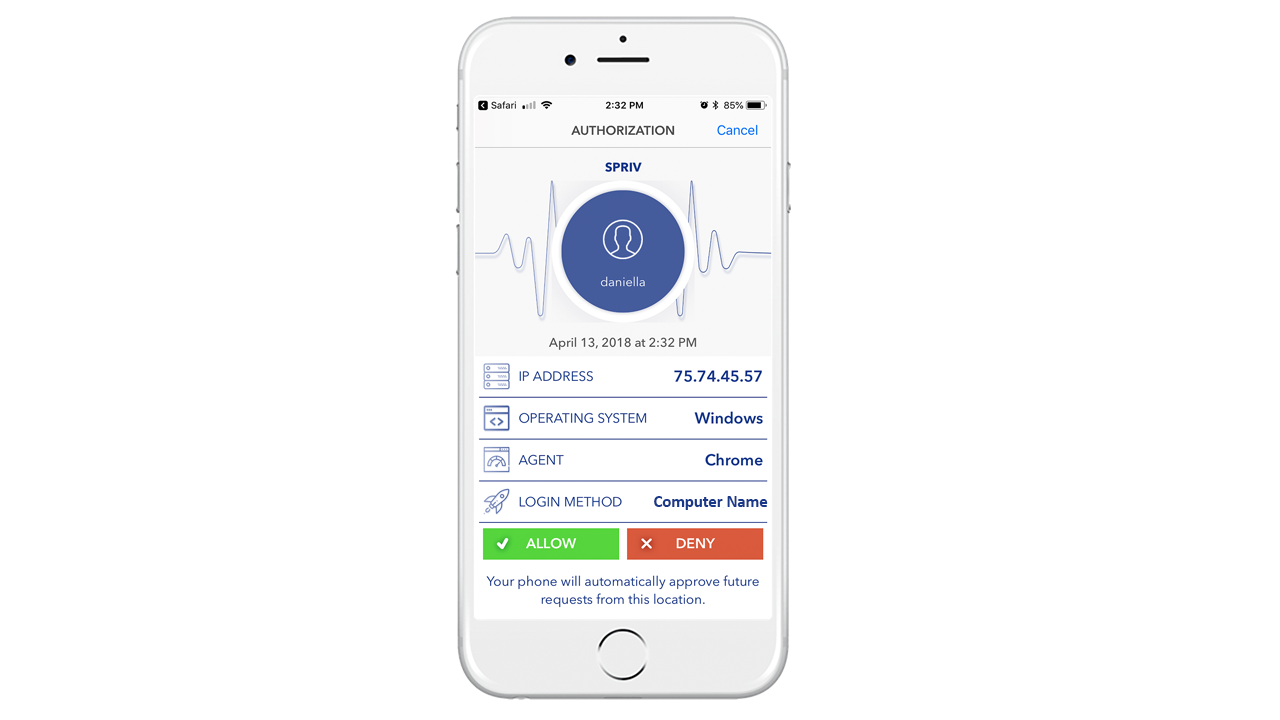


Description
Download Remote Desktop (RDP) Advanced Two Factor Authentication – RDP Security, Two Factor Authentication, Remote Access, Windows Security, Secure Remote Access, Advanced 2FA, Mobile Authentication, Push Notification, Adaptive Authentication
Overview
Spriv LLC’s Remote Desktop (RDP) Advanced Two Factor Authentication (2FA) is a specialized mobile application designed to enhance the security of remote access to Windows systems. Targeted primarily at professionals and IT administrators who rely on Remote Desktop Protocol (RDP) for daily operations, the app addresses a critical vulnerability: the risk of unauthorized access due to compromised credentials. By introducing a second layer of authentication, it significantly reduces the likelihood of successful cyberattacks, especially those leveraging brute force or credential stuffing techniques. The app serves as a mobile authentication tool that works in tandem with existing Windows environments, offering real-time control over login attempts. Its core purpose is to provide users with immediate visibility and authority to approve or deny access requests, ensuring that only verified individuals gain entry. This is particularly valuable in remote work settings, managed service provider environments, or any scenario where sensitive data is accessed across networks. The application integrates with established RDP infrastructure without requiring major system overhauls, making it accessible to both technical and non-technical users. Although the developer did not provide additional technical details about underlying protocols or encryption standards, the app’s focus on push notifications and adaptive logic suggests a modern, secure architecture. In the broader app ecosystem, it fills a niche for lightweight, mobile-first security tools that prioritize usability without sacrificing protection. For organizations seeking to strengthen endpoint security, this tool offers a focused, efficient solution tailored to one of the most exploited attack vectors in enterprise environments.
Key Features & Functionality
- Real-Time Push Notifications: The app delivers instant alerts to the user’s smartphone whenever an RDP login attempt is initiated. This allows immediate review and action, preventing unauthorized access before it occurs. For example, if a user attempts to log in from an unfamiliar location, the notification appears instantly, enabling them to verify the legitimacy of the request.
- Two-Factor Authentication via Mobile Approval: Instead of relying on static codes or time-based tokens, the app uses a push-based 2FA method. Users receive a prompt on their device and can approve or deny access with a single tap, streamlining the process while maintaining high security.
- Adaptive Authentication Logic: The system evaluates the context of each login attempt, such as location, device, and time of day, to determine the level of scrutiny required. This dynamic response ensures that routine access is fast and frictionless, while suspicious activity triggers additional checks.
- Seamless Windows Integration: The app is designed to work with existing Windows systems without requiring complex configuration. Once set up, it operates in the background, allowing users to manage access without disrupting their workflow.
- Quick and Easy Installation: The setup process is optimized for speed and simplicity. Users can install the app and link it to their RDP environment in minutes, making it ideal for rapid deployment across teams or personal use.
These features collectively provide a practical defense mechanism for users who depend on remote access. For instance, an IT support technician can securely access a client’s server from a public network, receiving a push notification that confirms the request originated from a trusted device. The ability to respond in real time enhances both security and operational efficiency.
Interface, UX & Performance
The user interface of Remote Desktop (RDP) Advanced Two Factor Authentication is designed with clarity and speed in mind. The layout prioritizes immediate access to pending login requests, with a clean, minimalistic design that avoids visual clutter. Navigation is straightforward, allowing users to view recent authentication attempts, manage linked systems, and adjust notification preferences with just a few taps. The app’s responsiveness is consistent across various Android device categories, though the developer did not list formal performance metrics. Although the developer did not specify minimum OS requirements, the app’s lightweight footprint of 24.5 MB suggests efficient resource usage, contributing to smooth operation even on mid-tier devices. Stability appears to be a focus, as the app functions reliably in the background, ensuring that push notifications are delivered promptly without noticeable delays. The design emphasizes usability for both novice and experienced users, with intuitive icons and clear action prompts. For example, approval and denial options are clearly labeled and easily accessible, minimizing the risk of accidental actions. While detailed feedback on battery consumption or data usage was not provided, the app’s focus on push-based authentication likely reduces continuous background activity compared to token-generating apps. Overall, the user experience is optimized for security without compromising accessibility, making it suitable for users who need reliable, on-the-go access control.
Platform Compatibility & Technical Requirements
The application is available exclusively on the Android platform, with a current version of 1.0.0 and a file size of 24.5 MB. It is designed for Android devices, though the developer did not specify minimum OS requirements or hardware compatibility details. This lack of explicit information means users should ensure their device meets standard Android app requirements for installation and operation. The app’s size is relatively compact, indicating efficient code and minimal storage impact, which benefits users with limited device space. While the developer did not disclose compatibility with iOS or other operating systems, the current availability is limited to Android. For users considering deployment across multiple devices, the absence of cross-platform support may be a consideration. However, the app’s focus on Android suggests it is tailored for users who rely on Android smartphones or tablets for remote access management. The release date of May 15, 2024, indicates this is a recently launched tool, positioning it as a modern solution in the evolving landscape of remote access security. The absence of detailed technical specifications does not detract from its core functionality, but users are advised to verify device compatibility before installation.
Pros and Cons
Pros
- Lightweight design at 24.5 MB, minimizing storage impact.
- Real-time push notifications for immediate login verification.
- Simple, intuitive interface suitable for non-technical users.
- Seamless integration with existing Windows RDP systems.
- Free to download and use, with no in-app purchases or subscriptions.
Cons
- Platform availability is limited to Android only.
- Specific technical requirements and OS compatibility were not disclosed.
- Developer did not provide information on battery or data usage patterns.
- No cross-platform support for iOS or other mobile ecosystems.
- Limited details on encryption or backend security protocols.
FAQ
Is Remote Desktop (RDP) Advanced Two Factor Authentication free to use?
Yes, the app is available at no cost. There are no in-app purchases or subscription fees associated with its core functionality.
Can I use this app on iOS devices?
As of now, the application is only available for Android devices. The developer has not released a version for iOS or other platforms.
How does the app enhance RDP security?
The app adds a second layer of authentication by requiring mobile approval for each login attempt. This prevents unauthorized access even if login credentials are compromised.
Do I need a separate account to use the app?
The app integrates with your existing Windows RDP setup. You do not need a separate account, but you must configure it with your RDP server settings.
Is my data secure when using the app?
While specific encryption details were not provided, the app uses push notifications and adaptive authentication, which are industry-standard practices for secure mobile access control.
Final Thoughts
Remote Desktop (RDP) Advanced Two Factor Authentication by Spriv LLC presents a focused, efficient solution for users seeking to strengthen their remote access security. Its mobile-first design, real-time approval system, and seamless integration with Windows environments make it a practical choice for professionals who rely on RDP for daily operations. The app’s lightweight nature and zero cost further enhance its appeal, especially for individuals and small teams looking to implement robust security without significant overhead. While the lack of cross-platform availability and detailed technical disclosures may limit its use in some scenarios, its core functionality remains highly relevant in today’s remote-first work environment. For IT administrators, remote workers, and anyone managing sensitive systems, this tool offers a reliable way to prevent unauthorized access through timely, mobile-based verification. Its adaptive authentication logic ensures a balance between security and usability, reducing friction for legitimate users while blocking threats. As cyber threats targeting RDP continue to rise, having a tool like this in your security arsenal is not just beneficial—it’s essential. Download Remote Desktop (RDP) Advanced Two Factor Authentication now to secure your remote access with confidence.
Guides & Tutorials for Remote Desktop (RDP) Advanced Two Factor Authentication. Spriv LLc
How to install Remote Desktop (RDP) Advanced Two Factor Authentication. Spriv LLc
- Click the Preview / Download button above.
- Once redirected, accept the terms and click Install.
- Wait for the Remote Desktop (RDP) Advanced Two Factor Authentication. Spriv LLc download to finish on your device.
How to use Remote Desktop (RDP) Advanced Two Factor Authentication. Spriv LLc
This software is primarily used for its core features described above. Open the app after installation to explore its capabilities.
User Reviews for Remote Desktop (RDP) Advanced Two Factor Authentication. Spriv LLc 0
No reviews found


